Task-Flow
The idea is to create an infrastructure or application that facilitate the execution and parametrization of a sequence of tasks.
Components/widgets/module-based approach
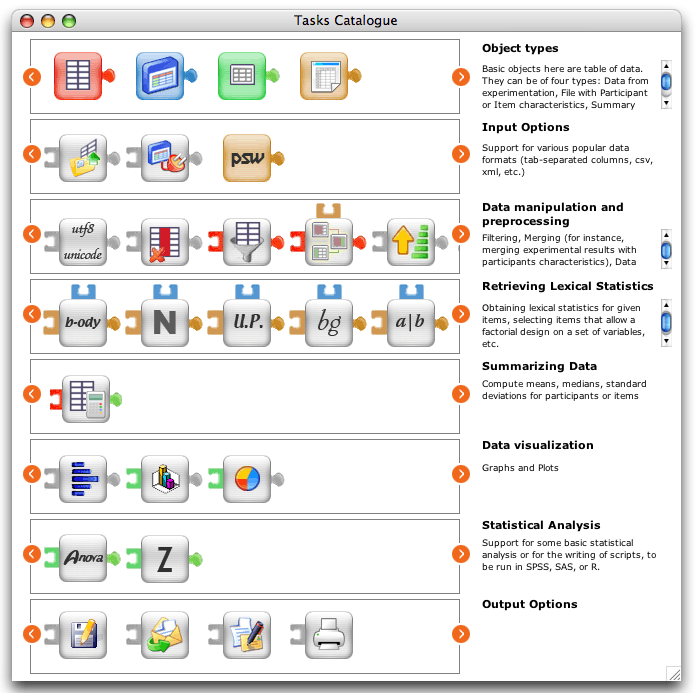
In the figure below, each rounded button in the graph below represents a module specialized in the execution of a given task.
Initially these modules will propose tools for the preparation, running, and analysis of experiments, in psycholinguistics. This is simply
because, as a psycholinguist, I already have for this task domain a large number of specialized scripts written in a crossplatform language
(Awk,Rebol, perl, VBA, and others). These modules fall into 3 main categories.
- EasyEYEtrack, for the easy running of eye tracking experiments with the SMI device. It handles the pre-processing and post-processing of the eye-movement data such that lab assistants with no knowledge whatsoever of any computer language can prepare, run, and analyze eye movement experiments.
- EasyDATA, for the easy treatment of the data between experimentation and statistical analyses. This package takes care of many of otherwise time consuming operations: remove specified subjects or items from the data file, select a subset of the data file based on user-defined specifications, compute the difference scores between two conditions, Z scores for a column of items, and a lot more.
- EasyLEX for access to a large variety of lexical statistics as grapho-phonological neighbourhood, mean bigram and trigram frequency, mean grapheme frequency, etc. of a string of characters (described in Lange, 1999b). With either retrieval of the information in an existing database or on-line computation (important for nonwords)
Two of these modules are detailed in the following page (with the possibility to download a working version):
But the Lexical analysis domain will only be used to realize a pilot. The project will then be extended to run any kind of task, in any domain.
Dependencies and restrictions in the kind of input that each module can take are indicated with the puzzle-like ends.
Visual programming
A new processing or exercise is defined by drag and dropping the corresponding modules in the work area. In this, we follow the
Orange widgets model.
For instance, the definition of the processing for an experiment may look like this:
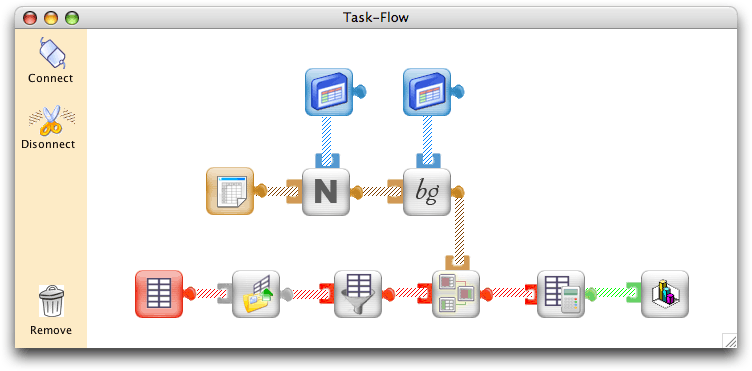
Item File
- An item file is defined.
- A module that computes the lexical neighborhoud (that is the number of words that share all letter but one with an item) is executed. For this module to work properly, another data file needs to be defined, the one that contains an examplar of the lexicon to use for
the neighbour count. The module is executed on items of column 4 (presumably a column that contains the spelling of the item).
- Then a module that computes bigram frequencies is executed (bigrams frequency is computed as the average of the bigram frequency values for each doublet of letters in the string). For this module to work properly, it is necessary to also define a file that contains a list of bigrams along with their frequency statistics. The module is executed on column 4 of the item file and the corresponding statistics are saved as new column of data.
Data File (with performance data)
- An performance data object is defined.
- Its content is defined as the one of a local file that contains
the results from a computer-based experiment (typically, a file that lists item ID along with Reaction Time and Accuracy for a set of participants). .
- A module that filters the data to two standard deviations is executed (overview of this module visual interface -- broken link)
- Then, a module is called that will merge add to the data file information about items.
- The resulting data file is presented to a module that produces summary statistics (means per condition) (overview of this module visual interface -- broken link)
- These summary statistics become the input of another module that produces a graphical representation of these data.
Why visual programming?
Shu (1988) stated that "A radical departure from traiditional programming is necessary if programming is to be made accessible to a large population". And this is exactly the issue at play here. In humanities or education, there is no requirement to acquire any programming skill and a large majority of staff are unable to program in a conventional textual language. It is unrealistic, given the multiple demands on the time of academics to expect a majority of them to develop programming skills. A toolkit like the one we propose would be widely adopted only if we provide academics with tools that are adapted to their level of skills.
In this project, we propose to make use of a visual programming language, that is "a programming language whose components are graphical. Programs in a visual programming language are formed by combining the graphical elements into a picture." (Golin, 1991)
- Visual Languages easily encourage granularity. This granularity can be fine-grained or coarse-grained. When fiine-grained, the elements of the language represent a small number of steps on the underlying interpreter (i.e., close to one-word commands found in usual computer languages). When coarse grained, the elements can represent a large number of steps (i.e., elements can then be seen as modules executing complex functions like a Fourrier Transform, a 3D plot, or others).
- Visual languages can give a more concept oriented view of a problem than a textual language. Instead of telling the computer how to slove a problem, the problem is merely stated and it is left up to the system how to achieve the solution. Users don't have to understand anything to the internal workings of the computer. This makes it ideal for people who have no experience of conventional (textual) programmming.
- When properly designed, pictures can be understood by people regardless of what language they speak.
- Visual languages can also help people learn how to program, helping users to create progressively more complex models of a system.
- In visual languages, the workflow between components and their interconnection can be expressed in a natural manner.
- The use of latently typed systems benefit the novice programmer who does not have to be concerned with the types of data being dealt with.
(See the page on
Visual Programming Language on the revolution-education wiki -- broken link).
Information attached to each module
Interconnection depencies
At start-up, each module only knows about interconnection depencies. There are some basic rules about how modules can be interconnected.
- To start with, three kind of modules
are possible in our system: input, computing, output. An input module can have connections going out, but not connection coming in. An output module can have connections coming, but no connection going out. A computing module need at least one connection in and at least one connection out.
- Then, our input modules can be of four different types: RT data, Item characteristics, pivot table, lexical statistics. Some computing modules can act on any of these data types (for instance, a "delete table column" module) but others can only act on a subset of these data types (for instance, a "plotting module" can only be successful with a pivot table kind of object).
Data Flow
As soon as the user starts to drag and drop modules in the workflow area, workflow information can be dynamically generated. Three variables are considered here:
- Module unique ID
- Input_from: from which modules does this module receive an input from (i.e., which modules need to be executed before this one)
- Data type: What is the data type for the input to this module?
- Object State: Objects can, at any one instant in time, be in one of three states, not yet started, currently executing, and finished execution.
- Output: If already available, the result of the last execution.
- Last Executed: Last time this module was executed (important in case the information has been refreshed in an module earlier in the data flow).
User-Defined Parameters
Then, after a module has been added to the workflow, double clicking on it will open a window that lets the user define
the parameters to the script. A parameter can for instance be the id of the column on which
lexical statistics need to be computed. In this, we follow the automator model.

Cross Platform
The application will be developed with Runtime Revolution (broken link), an environment for the rapid development of applications that compile to the most common platforms (Windows, Mac OS X, Linux).
Modular Approach
An important characteristic of this project is that a completely modular approach is adopted, by which existing modules can be modified or new modules can easily be added to the system without any alteration of the software architecture. All information required for the running of a module is stored outside of the application, the software being only used as an interpreter, that will display the interface elements for the widget.
A "module" is made of a bundle of files that include:
- A picture file, with the icon representing the module
- A file with the code to run when the module is executed.
- A file documenting the parameters used by the script (in such a way that the script can be executed without understanding anything to the code).
- A file specifying the type and workflow constraints for this module (take both input and output, but only accept pivot table data).
- A file defining the visual interface to present to provide user-defined parameters
Interoperable format for maximum re-use
Each one of the information mentioned above will be defined in interoperable formats (i.e., XML text file).
For instance, for the specification of the visual interface, the XUL standard will be used. An example of how this works is provided below.

Widget editor as a standalone application, but within a web-service, peer-to-peer infrastructure
Standalone application for richer user experience
Even if you make it as easy as possible for persons to share their
resource, most academics don't take the time to do it.
Provide educators/academics with useful desktop applications that help them in
their day-to-day activities. Provide them with useful tools that let them
organize their own resources on their computers as well as easily access
repositories of shared resources on the web. Make it easy to share their
resources within a team or with colleagues (what academics do a lot)... and
record information about what resources exist during these transactions. During
these transactions, ask the users whether he authorizes information about these
resources to be made available to the community.
All information that is personal (notes, preferences, logs, etc.) saved
on the desktop. All information that is to be shared, shared over the network,
in an interoperable format. Eventually, files remain on personal computers (computers
of academics are networked 24/24h), eventually duplicated onto many different
computers, but there is some system by which information about the files
(metadata) are maintained centrally. (this is yet to be defined - one
possibility is the idea of bi-directional links... ,
anytime you introduce a change to your file on your local computer, the shared
metadata are updated).
... and of course, have all this in a workflow
model. If I come across a bookmark that points to a powerpoint presentation, I
should be able to click on a button that will extract all pictures from that
powerpoint presentation found on the web and add it to my personal collection of
pictures used to illustrate my lectures. If I come across a page that contains
a quizz, I should be able to strip off the MCQ (multiple choice questions)
content and update my own list of MCQ questions. When I prepare multimedia
application, I should be able to tell my program that my lecture is on the
cerebellum, so have it propose me pictures that fit with this topic, one of which
I select and get added to my presentation, then introduce a quizz object and
have my program propose me a list of exercises and questions that are relevant
to the lesson topic, select one in the list, etc.
In sum
Interoperability of standards + advantages of a standalone + advantage of a networked environment. The best of all worlds.
Project Leader
Marielle Lange (BSc Psychology, Bruxelles; M.Phil Biology, Cambrdige; PhD Psycholinguistics, Bruxelles)
Marielle Lange is a Psycholinguist with about 10 years experience in academic research and lecturing.
She has extensive experience in psycholinguistics research and lexical database manipulation. She wrote a technical report on
"Manipulation de bases de données lexicales" (Lange, 1999) and designed and manage the lexicall website, which provides complete
and easy access to a diversity of lexical resources.
She also has a passion for programming and web development. In the late 1999, she developed a webmuseum of perception and cognition.
More recently, she set up cms system to support higher education research and teaching communities.
The projects she is involved in can be seen at projects.lexicall.